5. Prepare the Project
Project preparation translates the configured period and assimilation events into deterministic step windows and maps the reviewed summaries into per-step observation files. This chapter shows the configuration before executing that operation.
🟢 Run command:
PROJECT_DIR=/data/rofental/projects/project_2022_2023
echo "$PROJECT_DIR"
Review the event sequence
The Rofental project contains eight events:
data_assimilation:
  assimilation_events:
    - date: "2022-11-17"
      variable: station_hs
    - date: "2022-12-07"
      variable: station_hs
    - date: "2023-01-01"
      variable: station_hs
    - date: "2023-01-31"
      variable: station_hs
    - date: "2023-02-21"
      variable: station_hs
    - date: "2023-04-26"
      variable: scf
      product: SNOWCOVER
    - date: "2023-05-03"
      observation_time: "2023-05-03T05:26:24Z"
      variable: wet_snow_line
      product: WETSNOW
    - date: "2023-05-26"
      variable: scf
      product: SNOWCOVER
The product values must match obs.snowcover.product_tag and
obs.wetsnow.product_tag. Each raster event date must exist in its reviewed
summary. Station events use the configured station CSVs and metadata directly.
Prepare steps and observations
Purpose: create the steps/step_* windows and write the exact one-row raster
observation CSVs consumed by each matching event.
The positional argument is the project directory. --overwrite removes and
rebuilds a previous preparation only when the project has not completed a
successful immutable run. Omit it to reuse a hash-identical completed
preparation. --json is available for automation.
🟢 Run command:
openamundsen-da prepare "$PROJECT_DIR" --overwrite
The command replaces the former separate skeleton, snow-cover mapping and wet-snow mapping commands. One preparation manifest records the exact inputs and outputs so that the three operations cannot drift apart.
List the generated step directories as an immediate confirmation:
🟢 Run command:
find "$PROJECT_DIR/steps" \
  -mindepth 1 -maxdepth 1 -type d \
  -printf '%f\n' | sort
The output should contain step_00_init plus eight dated step directories.
Inspect the prepared project
The resulting windows are:
steps/
  step_00_init/
  step_01_20221117-20221207/
  step_02_20221207-20230101/
  step_03_20230101-20230131/
  step_04_20230131-20230221/
  step_05_20230221-20230426/
  step_06_20230426-20230503/
  step_07_20230503-20230526/
  step_08_20230526-20230630/
Raster events receive visible inputs under steps/*/obs/, for example:
steps/step_05_20230221-20230426/obs/obs_scf_SNOWCOVER_20230426.csv
steps/step_06_20230426-20230503/obs/obs_wet_snow_line_WETSNOW_20230503.csv
Each file contains the selected summary row and configured uncertainty statistics. This makes the observation used by an event inspectable before the model starts.
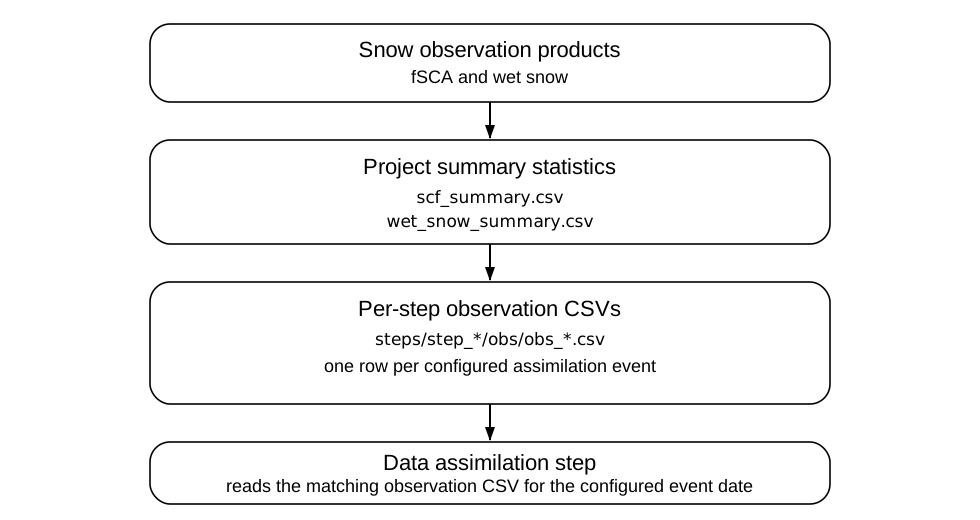
Configured raster products become project summaries; preparation then aligns selected summary rows with deterministic project steps.
Before running the model, confirm that the preparation manifest is successful, all nine step directories exist and every configured raster event has one matching CSV under
steps/*/obs/.
If an event is missing, fix the product tag, summary date or event configuration and rerun preparation. Continue with 6. Running the Model.