4. Preprocess Observations
This chapter converts the bundled snow-cover and wet-snow raster products into the project summary tables used during preparation. The Rofental example already contains tracked baseline summaries, so you can either inspect them and move on or reproduce them from the configured products.
From this point on, the tutorial assumes that the container shell is open at
/data/rofental and uses this project directory:
🟢 Run command:
PROJECT_DIR=/data/rofental/projects/project_2022_2023
echo "$PROJECT_DIR"
The first line assigns a Bash variable; entering PROJECT_DIR by itself would
try to run a command with that name. In the container shell, $PROJECT_DIR
expands to the stored path, so echo "$PROJECT_DIR" should print
/data/rofental/projects/project_2022_2023.
Inputs and configuration
Before preprocessing, confirm that the project YAML points each raster product to its intended input directory and summary table. The commands use these values directly; they do not guess a product or rewrite the YAML.
obs:
  snowcover:
    dir: obs/snowcover
    format: geotiff
    product_tag: SNOWCOVER
    summary_csv: obs/summaries/project_2022_2023/scf_summary.csv
  wetsnow:
    dir: obs/wetsnow
    format: geotiff
    product_tag: WETSNOW
    summary_csv: obs/summaries/project_2022_2023/wet_snow_summary.csv
Class mappings and uncertainty settings remain explicit in the same project
YAML; keep the shipped tutorial values unchanged. Preprocessing writes project
summary tables only. It does not create step folders. In the next chapter,
openamundsen-da prepare combines these summaries with assimilation_events
and generates the steps that you inspect before running the model.
1. Summarize snow-cover products
Purpose: validate and aggregate every configured snow-cover product inside the
ROI and write obs/summaries/project_2022_2023/scf_summary.csv.
The positional argument is the project directory. --overwrite permits an
existing generated summary and its completed preprocessing manifest to be replaced;
omit the option when you only want hash-identical work to be reused. --json
is available for machine-readable automation but is not needed in the tutorial.
🟢 Run command:
openamundsen-da observations snow-cover "$PROJECT_DIR" --overwrite
Before using the summary, confirm that expected acquisition dates are present,
valid support is sufficient and the fSCA, cloud and invalid fractions are
plausible. With uncertainty enabled, also inspect unc_mean, unc_min,
unc_max and unc_n_valid.
The uncertainty example below shows a continuous layer over valid fSCA pixels. The lower row zooms into a watershed detail; clouds remain masked.
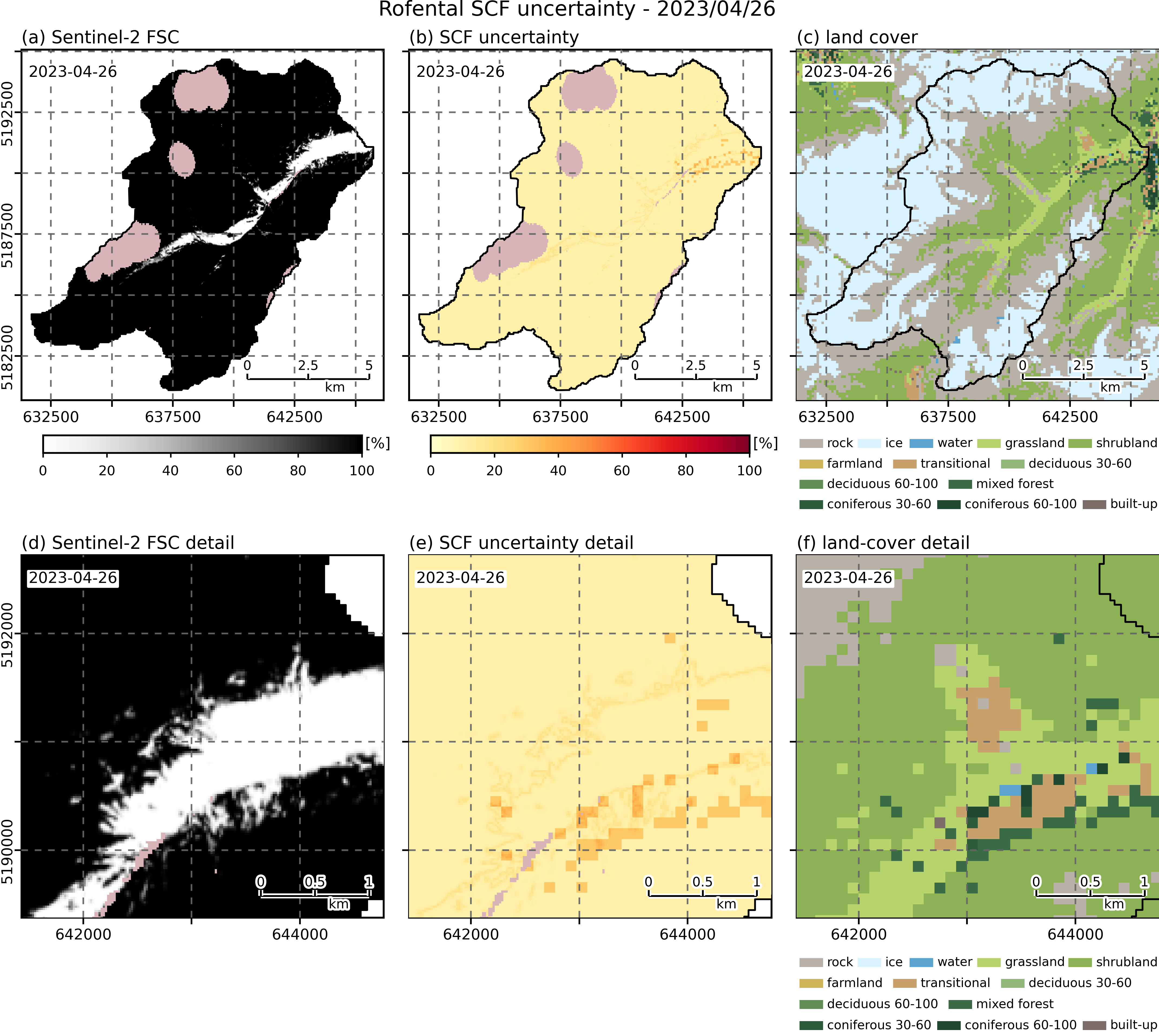
region_id identifies the processed ROI or subdomain. It is empty for these
full-ROI Rofental rows and populated when summaries are generated per subdomain.
Reference rows from scf_summary.csv:
| date | region_id | n_valid | n_snow | scf | cloud_fraction | invalid_fraction | source |
|---|---|---|---|---|---|---|---|
| 2022-10-03 | — | 90056 | 46132 | 0.51 | 0.00 | 0.36 | s2_fsc_rofental_2022_10_03.tif |
| 2022-10-05 | — | 80363 | 24157 | 0.30 | 0.00 | 0.41 | s2_fsc_rofental_2022_10_05.tif |
| 2022-10-08 | — | 35157 | 1171 | 0.03 | 0.00 | 0.77 | s2_fsc_rofental_2022_10_08.tif |
| 2022-10-13 | — | 13688 | 354 | 0.03 | 0.00 | 0.93 | s2_fsc_rofental_2022_10_13.tif |
| 2022-10-18 | — | 74037 | 2498 | 0.03 | 0.00 | 0.48 | s2_fsc_rofental_2022_10_18.tif |
2. Summarize wet-snow products
Purpose: validate and aggregate the configured wet-snow products and write
obs/summaries/project_2022_2023/wet_snow_summary.csv plus the configured wet
snow line diagnostics.
The positional argument and options have the same meaning as for snow cover.
Use --overwrite here to reproduce the tracked summary directly from the source
products and the current uppermost-crossing operator.
🟢 Run command:
openamundsen-da observations wet-snow "$PROJECT_DIR" --overwrite
Confirm that the selected dates, wet-snow fractions and support counts are plausible before scheduling events.
Reference rows from wet_snow_summary.csv:
| date | wet_snow_fraction | n_valid | n_wet | source |
|---|---|---|---|---|
| 2023-03-12 | 0.02 | 158583 | 3547 | WSM_S1A_SAR_track117_2023_03_12_17_07_24.tif |
| 2023-03-16 | 0.03 | 160355 | 4835 | WSM_S1A_SAR_track168_2023_03_16_05_27_37.tif |
| 2023-03-24 | 0.46 | 158583 | 73560 | WSM_S1A_SAR_track117_2023_03_24_17_07_24.tif |
| 2023-03-28 | 0.27 | 160355 | 43183 | WSM_S1A_SAR_track168_2023_03_28_05_27_38.tif |
| 2023-04-05 | 0.06 | 158583 | 9808 | WSM_S1A_SAR_track117_2023_04_05_17_07_24.tif |
When preprocessing fails
A mixed GeoTIFF/NetCDF directory, missing configured format, invalid class
mapping, absent uncertainty sidecar or escaping path fails before writing a new
summary. If a completed manifest exists but the input hash changed, rerun with
--overwrite only after reviewing the changed product or configuration.
For the general input contract, see Input data. Continue with 5. Prepare the Project.