3. Example Data: Rofental
The tutorial uses the bundled Rofental setup as one concrete, reproducible example. This page describes that example once so later chapters do not need to repeat the same context.
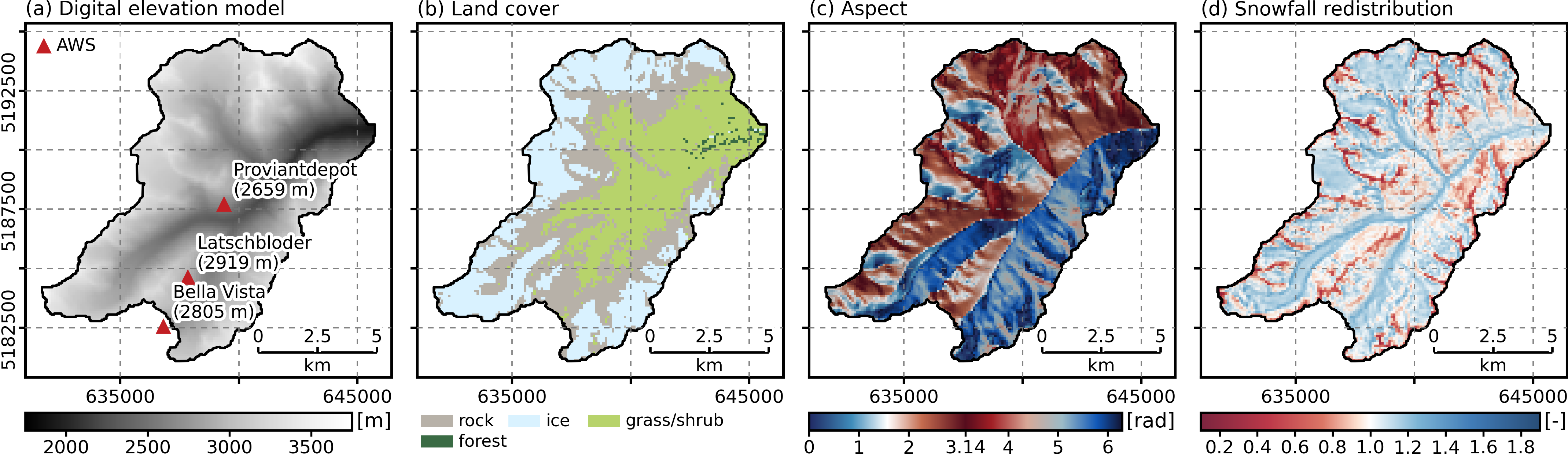
Rofental tutorial setup map rendered from projects/project_2022_2023/maps.yml, showing the overview location, DEM with forcing stations, the Rofental land-cover grouping and the snow redistribution factor (SRF).
What Is Included
The example setup contains:
- model grids and ROI files under
grids/andenv/ - meteorological forcing inputs under
meteo/ - snow-cover, wet-snow, and station observations under
obs/ - one project configuration under
projects/project_2022_2023/
Directory overview:
/data/rofental/
  rofental.yml
  env/
  grids/
  meteo/
  obs/
    snowcover/
    wetsnow/
    stations/
  projects/
    project_2022_2023/
      project_2022_2023.yml
Available Resolutions
The bundled example contains three spatial resolutions:
100 m250 m500 m
The active resolution is selected in the setup YAML:
File: /data/rofental/rofental.yml
domain: "rofental"
resolution: 100
timestep: "3H"
The corresponding grids are named with the same pattern, for example:
grids/dem_rofental_100.ascgrids/dem_rofental_250.ascgrids/dem_rofental_500.ascgrids/lc_rofental_100.ascgrids/svf_rofental_100.ascgrids/srf_rofental_100.asc
Observation Data In The Example
Three observation groups are bundled:
obs/snowcover/: fractional snow covered area (fSCA) rastersobs/wetsnow/: wet-snow mask rastersobs/stations/: station snow observations for assimilation, benchmarking and plots
For the snow-cover and wet-snow GeoTIFF inputs, the example also ships matching
uncertainty sidecars named <stem>_uncertainty.tif next to the source rasters.
These observation raster products are the starting point for the preprocessing chapter. They are not yet in the tabular form consumed by the step-wise project pipeline, but the uncertainty layers they need for uncertainty-aware preprocessing are already included.
Project Configuration Used In The Tutorial
The main project file is:
/data/rofental/projects/project_2022_2023/project_2022_2023.yml
This file defines:
- the project period
- observation directories and product tags
- class mappings
- data assimilation events
- likelihood, resampling, rejuvenation, uncertainty, and output settings
The setup file /data/rofental/rofental.yml remains pure openAMUNDSEN configuration,
while the project YAML contains the data assimilation-specific configuration.
Continue with 4. Preprocess Observations.